
Visual Content Examples for Blogs To Keep Readers Engaged
Posted on
You know that feeling when you land on a blog post and instantly click away because it’s just… walls of text?
We’ve all done it.
Even if the information is useful, huge blocks of writing can feel exhausting online. Our brains are busy. We scroll quickly. We skim. We jump around looking for something that catches our attention.
That’s exactly why visual content matters so much now.
A good image, infographic, chart or screenshot can completely change how a blog post feels. Suddenly, the content becomes easier to follow, more memorable and far more engaging. And honestly, visuals don’t just help readers. They help bloggers too.
Visual content can:
- increase time spent on page
- improve social shares
- break up long articles
- make tutorials easier to understand
- help readers remember information
- improve Pinterest and image search traffic
- make a blog look more professional
And the best part? You don’t need expensive software or professional design skills anymore. Most bloggers can create strong visuals using free or low-cost tools.
If you’re wondering what examples of visual content actually work on a blog, here are some of the best options to try.
Infographics
Infographics remain one of the most effective forms of visual content for blogs.
Why? Because they simplify information.
Instead of forcing readers through long explanations, an infographic turns key points into something visual and easy to digest. They work especially well for:
- statistics
- step-by-step guides
- timelines
- comparisons
- checklists
- processes
- summaries
And honestly, some topics almost need visual support.
Think about budgeting tips, blogging tutorials, SEO strategies, travel planning or health routines. Readers often understand things much faster when they can see the information laid out visually.
Infographics are also highly shareable on Pinterest, which can help bring long-term traffic to a blog post.
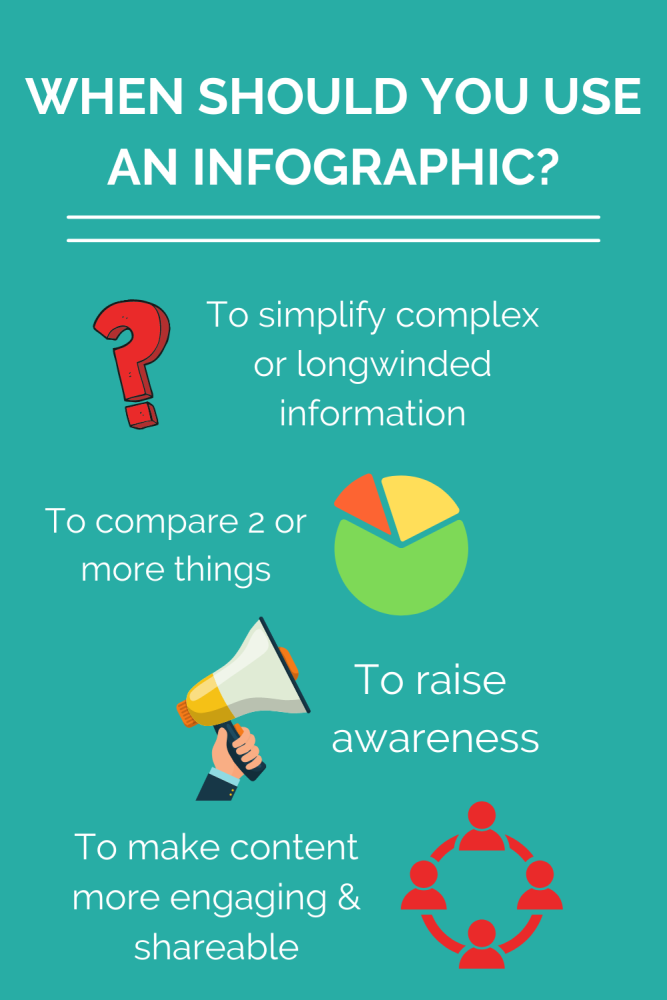
The infographic included in this article is a good example. Instead of explaining everything through paragraphs alone, visual elements help break down the information in a quicker and more engaging way.
One thing I’ve noticed over the years of blogging is that readers often save infographics for later. That’s huge. It means your content stays useful beyond the initial visit.
Videos
Video content is everywhere now. And while blogging certainly isn’t dead, readers increasingly expect some level of visual movement alongside written content.
That doesn’t mean every blog needs professional YouTube videos or cinematic editing. Not at all.
Simple videos can work incredibly well, such as:
- screen recordings
- tutorials
- behind-the-scenes clips
- product demonstrations
- quick explainers
- travel clips
- before-and-after videos
Even short embedded videos can make a blog feel more interactive and modern.
For example, if you write about blogging, you could show a quick screen recording of how to use a tool. If you write travel content, a short beach or hiking clip instantly adds atmosphere and emotion to the article.
People connect with movement far faster than static text.
And here’s something important many bloggers overlook: video can also help reduce bounce rate. If someone spends two minutes watching an embedded clip, that sends positive engagement signals to search engines.
You don’t need expensive editing software either. Plenty of creators now use simple apps on their phones to create polished content.
Of course, creating video content is much easier when you have the right tools. Many bloggers spend time researching the best video editing software so they can create cleaner tutorials, smoother travel clips and more professional-looking social media content without needing advanced editing skills.
Screenshots and Tutorials
This is probably one of the most underrated forms of visual content for blogs.
Screenshots are incredibly useful.
If you’re teaching something online, screenshots can make your content dramatically easier to follow. Readers don’t want to guess what buttons to click or where settings are hidden. They want to see it.
This works especially well for:
- blogging tutorials
- WordPress guides
- online banking tutorials
- app walkthroughs
- Canva tutorials
- social media instructions
- software reviews
I actually think screenshots build trust too.
When readers can see real examples, the content feels more authentic and lived-in. It feels like advice from someone who has genuinely done the thing they’re explaining.
And honestly, tutorials without visuals often feel frustrating now. We’re so used to visual guidance online that plain-text instructions can feel outdated very quickly.
Charts and Graphs
Some information is simply easier to understand visually.
Charts and graphs work brilliantly for:
- income reports
- traffic growth
- business statistics
- survey results
- comparisons
- budgeting data
- financial trends
Instead of paragraphs full of numbers, readers can instantly understand the main takeaway from a graph.
This is especially useful on business and money blogs where data matters.
For example, if you’re explaining how your blog traffic increased over time, a simple line graph often communicates more effectively than several paragraphs describing it.
Visual data also makes content feel more credible and authoritative.
Quote Graphics
Quote graphics are still hugely popular across platforms like Pinterest, Instagram and Facebook.
And there’s a reason for that.
People love content that feels relatable, inspiring or emotionally validating. A simple quote combined with an attractive design can perform extremely well socially.
For bloggers, quote graphics can:
- encourage shares
- increase brand recognition
- add personality to posts
- make content more memorable
- create Pinterest-friendly graphics
You can create these incredibly quickly now using Canva or other free design tools.
But there’s one important thing to remember… generic motivational quotes are everywhere.
The best-performing quote graphics are often:
- original thoughts
- personal insights
- niche-specific advice
- relatable observations
- practical mini tips
That personal angle matters.
GIFs and Memes
Sometimes blogs can feel a little too serious.
GIFs and memes add personality and humour, which helps readers feel more connected to the content.
Obviously they don’t suit every niche or every article. But in the right context, they can make a blog feel far more human and relatable.
They work especially well in:
- lifestyle blogs
- blogging content
- parenting posts
- relatable humour articles
- social media content
- opinion pieces
A well-placed GIF can break up heavy sections of text and add emotion instantly.
And honestly, humour is memorable.
Readers are far more likely to remember a post that made them smile compared to one that felt dry and robotic.
Original Photography
Original photos are one of the most powerful types of visual content a blogger can use.
Stock photos still have their place. But original photography creates authenticity that generic images simply can’t replicate.
This is especially important in niches like:
- travel
- food
- lifestyle
- home
- parenting
- fashion
- DIY
- gardening
Readers increasingly want real content from real people.
You know that overly polished stock image look? Most people recognise it instantly now. And sometimes it can make a blog feel less trustworthy.
Even imperfect original images often perform better because they feel genuine.
Social Media Graphics
Many bloggers now create graphics specifically designed for sharing.
These might include:
- Pinterest pins
- Instagram carousels
- Facebook graphics
- article teaser images
- blog post covers
This type of visual content helps extend the life of a blog post beyond Google.
Pinterest in particular still works extremely well for many bloggers because it functions more like a visual search engine than traditional social media.
A strong Pinterest image can continue sending traffic for months or even years.
Why Visual Content Helps SEO
Visual content doesn’t just improve appearance. It can also support SEO in several ways.
Good visuals can:
- increase time on page
- reduce bounce rates
- improve readability
- generate backlinks
- increase social shares
- help images rank in Google Images
- improve user experience
Search engines ultimately want content that satisfies readers.
If visuals help people stay longer, engage more and understand content better, that’s a positive signal.
Image optimisation matters too.
Simple things like:
- descriptive file names
- compressed image sizes
- alt text
- relevant captions
…can all help improve visibility.
Where To Find Images for Blog Posts
There are lots of places bloggers can find visuals now.
Some bloggers create everything themselves. Others combine original visuals with stock photography and graphics.
Popular options include:
- Canva
- Unsplash
- Pexels
- Pixabay
- Adobe Stock
- original photography
- screenshots
- AI-generated graphics
- infographics
But one thing is important: never just copy random images from Google.
Images still have copyright protection. Bloggers should always ensure they have permission to use visuals properly.
That’s why stock photo libraries and graphic design tools have become so popular.

Tips for Creating Better Visual Content
You don’t need to become a professional designer overnight.
Honestly, simple and clear usually works best.
A few things that help:
- use consistent fonts and colours
- avoid cluttered graphics
- make text easy to read
- compress images for faster loading
- use visuals naturally within the article
- create graphics that support the content, not distract from it
And perhaps most importantly, think about the reader experience.
Visual content should make the blog easier and more enjoyable to consume.
Not overwhelming.
Final Thoughts
Visual content has become a huge part of modern blogging because people naturally engage more with information they can quickly understand and connect with emotionally.
Whether it’s infographics, screenshots, videos, charts or original photography, the right visuals can make a blog feel more engaging, memorable and professional while also supporting SEO and social sharing.
Good visual content doesn’t need to be complicated or expensive. Sometimes a simple screenshot, a useful infographic or a well-designed image is enough to completely transform how readers experience a blog post.